Best Crypto Wallets 2026: Hot vs Cold, Custodial vs Self-Custody

Editorial pen name · ChainGain
Alex Mercer is the editorial pen name used for ChainGain’s cryptocurrency education content. Articles are based on cited sources and reproducible comparisons. Editorial profile
Beginner
A crypto wallet is a tool that stores your private keys — the passwords that give you access to your cryptocurrency on the blockchain (see Bitcoin Developer Guide). Choosing the right wallet is one of the most important decisions you’ll make in crypto, because your wallet is the only thing standing between your funds and potential loss or theft.
A few months later, a major exchange got hacked and users lost millions. That experience taught me a lesson I’ll never forget: understanding wallets isn’t optional — it’s essential.
This guide covers every type of crypto wallet, how they work, and how to pick the right one for your situation. Whether you’re holding $50 or $50,000 in crypto, this information applies to you.
What Is a Crypto Wallet?
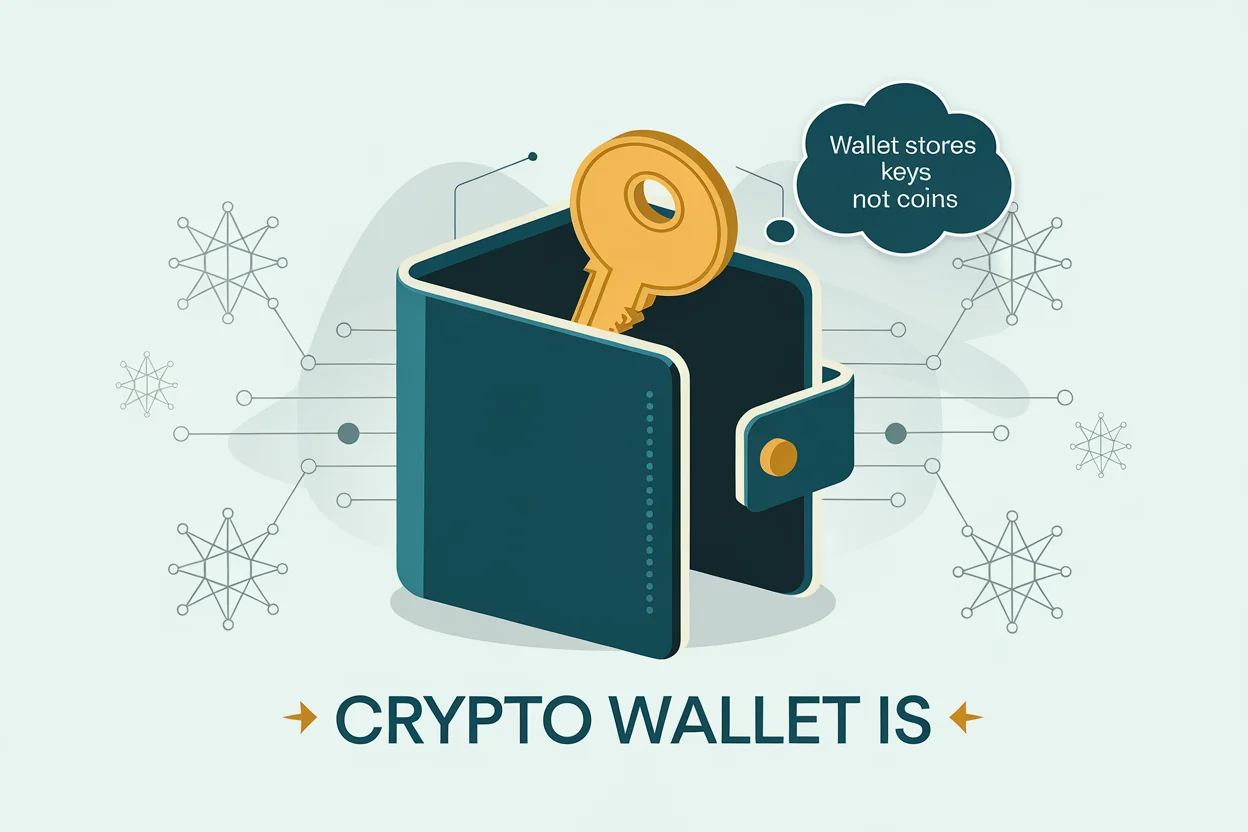
A crypto wallet is software or hardware that stores your private keys and lets you send, receive, and manage your cryptocurrency. Despite the name, wallets don’t actually hold your coins — your crypto exists on the blockchain. The wallet simply holds the keys that prove ownership.
Think of it this way: the blockchain is like a public safe deposit system. Everyone can see the boxes and what’s inside them. Your wallet holds the unique key that opens your specific box. Without that key, no one — including you — can access what’s inside.
Every crypto wallet involves two critical components:
- Public key (wallet address) — A long string of characters you share with others to receive crypto. It’s like your bank account number. Example:
0x742d35Cc6634C0532925a3b844Bc9e7595f... - Private key — A secret code that proves you own the crypto at that address and lets you send it. If someone gets your private key, they control your funds. You should never share this with anyone.
Most modern wallets also use a seed phrase (also called a recovery phrase) — a set of 12 or 24 words (defined by the BIP-39 standard) that can regenerate all your private keys. This is your ultimate backup. If your phone breaks or your hardware wallet is lost, the seed phrase is the only way to recover your crypto.
Types of Crypto Wallets
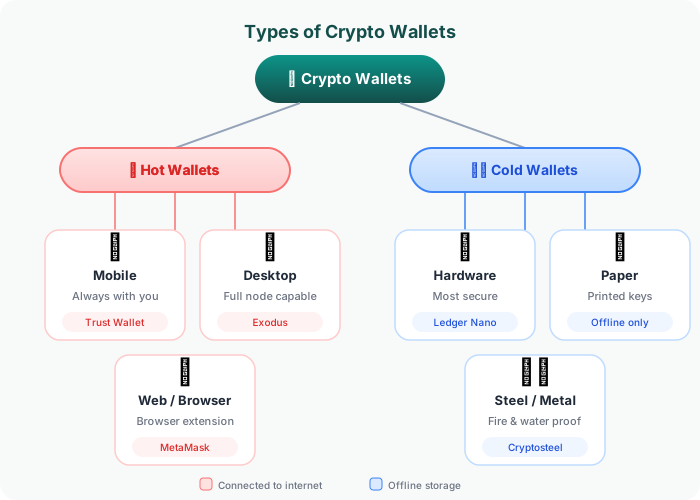
Crypto wallets are categorized in two main ways: by connection type (hot vs. cold) and by control type (custodial vs. non-custodial). Understanding these distinctions is critical for making the right choice.
Hot Wallets vs. Cold Wallets
| Feature | Hot Wallet | Cold Wallet |
|---|---|---|
| Internet connection | Always connected | Offline (air-gapped) |
| Examples | MetaMask, Trust Wallet, Phantom | Ledger, Trezor, paper wallets |
| Best for | Daily transactions, small amounts | Long-term storage, large amounts |
| Setup difficulty | Easy (5-10 minutes) | Moderate (15-30 minutes) |
| Cost | Free | $60-$250 |
| Security level | Good (vulnerable to online attacks) | Excellent (immune to remote hacks) |
| Convenience | High (instant access) | Lower (requires physical device) |
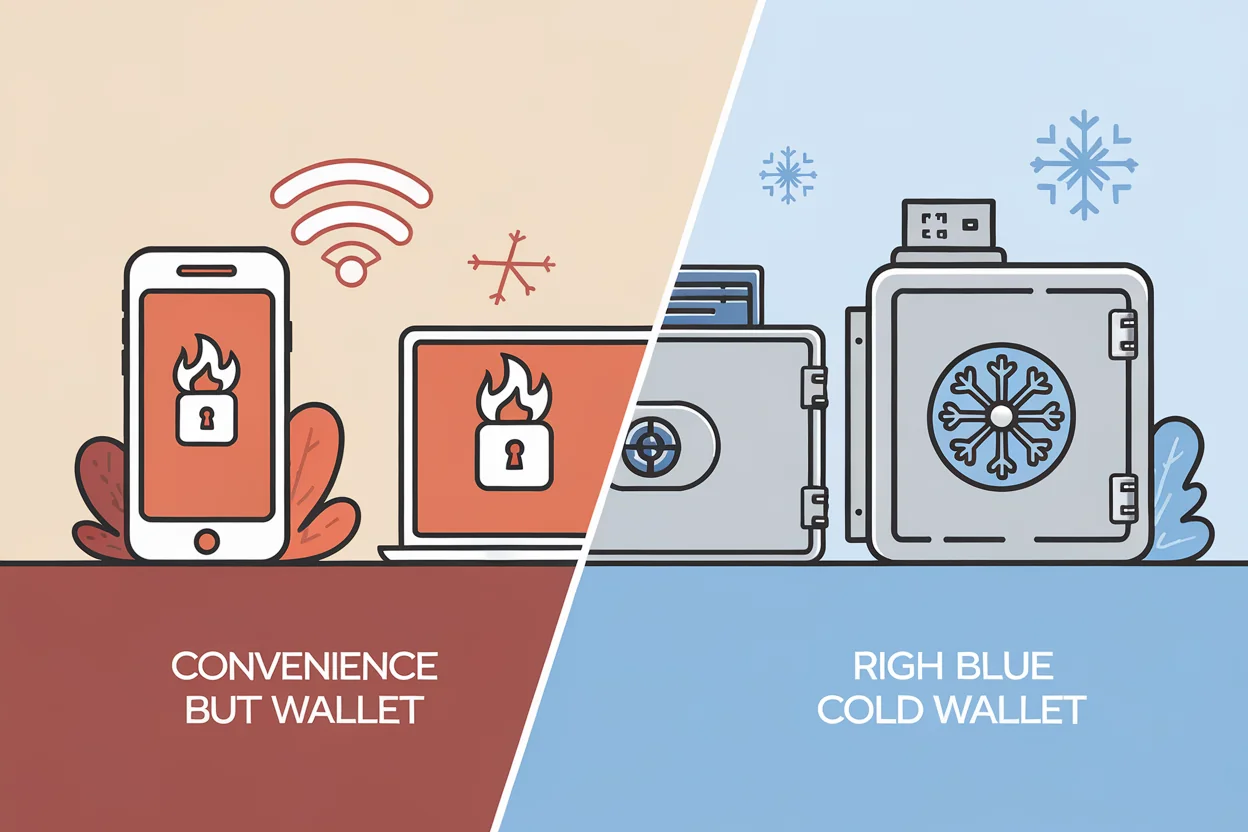
Hot wallets are software applications on your phone, browser, or computer. They’re always connected to the internet, which makes them convenient for quick transactions but more vulnerable to hacking.
Cold wallets are physical devices (or methods) that store your keys completely offline. Since they never connect to the internet directly, remote hackers can’t access them.
Custodial vs. Non-Custodial Wallets
| Feature | Custodial Wallet | Non-Custodial Wallet |
|---|---|---|
| Who holds the keys? | The company (exchange) | You |
| Examples | Binance, Coinbase, Kraken accounts | MetaMask, Ledger, Trust Wallet |
| Account recovery | Password reset via email | Seed phrase only (no reset option) |
| Risk if company fails | You may lose access (FTX example) | No impact — your keys, your coins |
| Ease of use | Very easy (like a bank app) | Moderate learning curve |
| Transaction fees | Set by the platform | You choose (network fee only) |
Custodial wallets are managed by a third party — usually a crypto exchange. The company holds your private keys on your behalf. This is similar to how a bank holds your money. It’s convenient, but you’re trusting the company not to lose, freeze, or misuse your funds. When FTX collapsed in 2022, users with custodial wallets on the platform lost billions.
Non-custodial wallets give you full control of your private keys. No company can freeze your account or prevent you from accessing your crypto. The trade-off is responsibility: if you lose your seed phrase, there is no customer support to call. Your funds are gone permanently.
This is what the crypto community means by “not your keys, not your coins.”
Wallet Types Explained
Let me break down each specific wallet type you’ll encounter.
Mobile Wallets
Mobile wallets are smartphone apps that store your keys on your device. They’re the most popular wallet type for everyday crypto users because they combine convenience with reasonable security.
Popular mobile wallets:
- Trust Wallet — Supports 10M+ tokens across 100+ blockchains. Open-source. Owned by Binance but non-custodial.
- Phantom — Originally built for Solana, now supports Ethereum and Bitcoin. Clean interface and built-in swap feature.
- Coinbase Wallet — Separate from the Coinbase exchange app. Non-custodial with an easy-to-use interface. Good for beginners moving to self-custody.
When to use: Daily transactions under $5,000. Interacting with dApps. Receiving payments.
Browser Extension Wallets
Browser wallets run as extensions in Chrome, Firefox, or Brave. They’re essential for interacting with DeFi protocols, NFT marketplaces, and other web-based crypto applications.
Popular browser wallets:
- MetaMask — The most widely used browser wallet. Supports Ethereum and all EVM-compatible chains. Over 30 million monthly users.
- Rabby — Alternative to MetaMask with built-in transaction simulation (shows what a transaction will do before you sign it). Growing rapidly in the DeFi community.
When to use: DeFi trading, swaps, NFT purchases, interacting with any web3 application.
Hardware Wallets (Cold Storage)
Hardware wallets are physical devices — typically USB-sized — that store your private keys on a secure chip. They sign transactions offline, meaning your keys never touch an internet-connected device.
Popular hardware wallets:
| Device | Price | Supported Assets | Display | Best For |
|---|---|---|---|---|
| Ledger Nano S Plus | $79 | 5,500+ coins | Small screen | Budget cold storage |
| Ledger Nano X | $149 | 5,500+ coins | Small screen + Bluetooth | Mobile + cold storage |
| Trezor Model T | $179 | 1,800+ coins | Color touchscreen | Open-source enthusiasts |
| Trezor Safe 3 | $79 | 8,000+ coins | Small screen | Budget + secure element |
When to use: Long-term holdings. Amounts over $500. Anyone serious about security.
Desktop Wallets
Desktop wallets are installed programs on your computer. They offer more features than mobile wallets but are limited to the device they’re installed on.
Popular desktop wallets:
- Electrum — Bitcoin-only. Lightweight, fast, and highly configurable. Popular among experienced Bitcoin users.
- Exodus — Multi-coin wallet with a polished interface. Good for beginners who want a desktop experience. Also has a mobile version.
When to use: Managing a multi-coin portfolio from a dedicated computer. Bitcoin-focused users (Electrum).
Paper Wallets
A paper wallet is simply your public and private keys printed on a physical piece of paper. While theoretically the most secure form of cold storage (no electronic device to hack), they’re fragile, easy to damage, and difficult to use for transactions. Hardware wallets have largely replaced paper wallets for most users.
How to Choose the Right Wallet
The best wallet depends on your specific situation. Here’s a decision framework based on common scenarios:
By Amount Held
| Amount | Recommended Wallet Type | Reasoning |
|---|---|---|
| Under $100 | Exchange (custodial) or mobile wallet | Convenience outweighs risk at small amounts |
| $100 – $1,000 | Mobile wallet (non-custodial) | Take self-custody but keep it accessible |
| $1,000 – $10,000 | Hardware wallet + mobile for spending | Secure the bulk, keep a small hot wallet for transactions |
| Over $10,000 | Hardware wallet (primary) + multi-sig | Maximum security for significant holdings |
By Use Case
- Just buying and holding → Hardware wallet (Ledger or Trezor)
- Active DeFi trading → Browser extension (MetaMask or Rabby) connected to hardware wallet
- Receiving crypto payments → Mobile wallet (Trust Wallet or Phantom)
- Complete beginner → Start on an exchange, then learn to use a mobile wallet, then graduate to hardware
Key Factors to Consider
- Supported blockchains — Does the wallet support the cryptocurrencies you own? Ethereum, Bitcoin, and Solana wallets are often different.
- Security features — Biometric unlock, 2FA support, transaction simulation, and open-source code are all positive signals.
- Backup options — How easy is it to back up and restore your wallet? Seed phrase is standard, but some wallets offer additional recovery methods.
- User interface — If the wallet is too complex, you’re more likely to make a costly mistake. Match the wallet to your experience level.
- Community and track record — How long has the wallet been around? Has it been audited? Does it have an active development team?
Setting Up Your First Non-Custodial Wallet
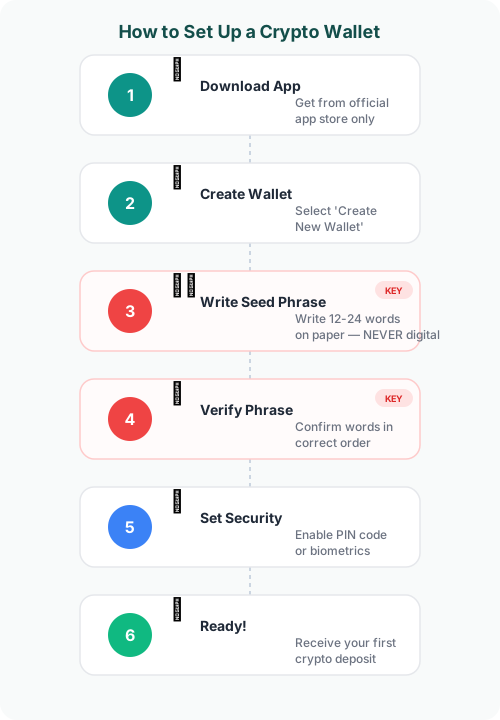
Here’s a step-by-step guide to setting up a mobile wallet. I’ll use Trust Wallet as the example since it’s beginner-friendly and widely available, but the process is similar for most wallets.
Step 1: Download from Official Sources Only
Download the wallet app from the official website or verified app store listing. Never download from third-party links, search ads, or unofficial sources. Scammers create fake wallet apps that steal your keys.
- For mobile: Apple App Store or Google Play Store
- For browser: Official Chrome Web Store or the wallet’s website
- For hardware: Buy only from the manufacturer’s official store — never secondhand
Step 2: Create a New Wallet
Open the app and select “Create a new wallet.” The app will generate your keys and present your seed phrase.
Step 3: Write Down Your Seed Phrase
This is the most critical step. The wallet will display 12 or 24 words in a specific order. Write them down on paper — not in a screenshot, not in a notes app, not in an email.
Why not digital? If your phone or computer is compromised by malware, a digital copy of your seed phrase means your crypto is stolen. Physical paper stored securely is far safer.
Tips for seed phrase storage:
- Write on paper and store in a secure location (safe, lockbox)
- Consider making two copies in different locations
- Metal seed phrase backup plates exist for fire/water protection ($20-$50)
- Never type your seed phrase on any website or app other than your wallet during recovery
Step 4: Verify Your Seed Phrase
The wallet will ask you to confirm your seed phrase by selecting words in the correct order. This ensures you’ve recorded it properly.
Step 5: Set Up Security
Enable all available security features:
- Biometric unlock (fingerprint or face ID)
- PIN code
- Auto-lock timer
Step 6: Receive Your First Crypto
Tap “Receive,” select the cryptocurrency, and share the displayed address or QR code with the sender. Always double-check the first and last few characters of the address before confirming any transaction.
Wallet Security Best Practices
Here are the security practices I follow and recommend to everyone.
The Golden Rules
- Never share your seed phrase or private key with anyone — No legitimate service will ever ask for it. If someone asks, it’s a scam. Period.
- Use a hardware wallet for significant amounts — If you’d be seriously hurt by losing the amount, it should be in cold storage.
- Verify every transaction before signing — Read what you’re approving. Scammers use deceptive smart contracts that drain wallets. Tools like Rabby and Pocket Universe help simulate transactions before execution.
- Keep your software updated — Wallet updates often include security patches. Use auto-update when available.
- Use separate wallets for different purposes — Keep a “hot” wallet with small amounts for daily use and a “cold” wallet for long-term storage. This limits your exposure if one wallet is compromised.
Common Scams to Avoid
| Scam Type | How It Works | How to Avoid |
|---|---|---|
| Fake wallet apps | Cloned app steals your seed phrase during setup | Only download from official sources; verify developer name |
| Seed phrase phishing | “Customer support” asks for your seed phrase to “fix an issue” | No one legitimate will ever ask for your seed phrase |
| Malicious approvals | A website asks you to sign a transaction that gives it unlimited access to your tokens | Read every transaction; use transaction simulators; revoke unused approvals |
| Address poisoning | Scammer sends tiny transactions from a similar-looking address, hoping you copy-paste it for future transfers | Always verify the full address, not just the first/last characters |
| Fake airdrops | “Free tokens” appear in your wallet that require interaction with a malicious contract to claim | Ignore unknown tokens; never interact with contracts you didn’t initiate |
Multi-Chain Wallets vs. Single-Chain Wallets
As the crypto ecosystem has grown, so has the number of blockchains. This creates a practical question: should you use one wallet that supports multiple chains, or specialized wallets for each?
Multi-Chain Wallets
Wallets like Trust Wallet and Exodus support dozens of blockchains from a single app. This is convenient but can mean that support for any individual chain is less deep than a dedicated wallet.
Pros: One app for everything, simpler portfolio management, one seed phrase to back up.
Cons: May not support all features of every chain, slightly larger attack surface.
Single-Chain Wallets
Wallets like Phantom (Solana-focused) or Electrum (Bitcoin-only) are optimized for one ecosystem. They tend to offer deeper functionality and faster updates for their specific chain.
Pros: Best features for that specific chain, often lighter and faster, stronger community support.
Cons: Need multiple apps for multiple chains, more seed phrases to manage.
Most beginners are fine starting with one multi-chain wallet and specializing later.
Continue Learning
- What Is Cryptocurrency?
- How Blockchain Works
- What Are Stablecoins?
- Cryptocurrency Security
- Crypto vs Bank Transfers: Remittance Cost Guide
- Stablecoin Savings Guide: Protect Your Money from Inflation
- What Is DeFi? Decentralized Finance Explained
- Crypto Glossary: 200+ Terms Explained
- How to Spot and Avoid Crypto Scams
- How to Buy Your First Cryptocurrency
Frequently Asked Questions
What happens if I lose my crypto wallet?
If you lose the device your wallet is on (phone, computer, hardware wallet), your crypto is not lost — as long as you have your seed phrase. You can restore your wallet on a new device using those 12 or 24 words. However, if you lose both your device and your seed phrase, your crypto is permanently inaccessible. No company or authority can recover it. This is why securely storing your seed phrase is the most important step in crypto.
Are crypto wallets free?
Software wallets (mobile apps, browser extensions, desktop programs) are free to download and use. You only pay network transaction fees when sending crypto. Hardware wallets cost between $60 and $250 depending on the model and features. The wallet itself doesn’t charge for receiving crypto — that’s always free regardless of wallet type.
Can a crypto wallet be hacked?
Hot wallets (software wallets connected to the internet) can be compromised through malware, phishing attacks, or malicious smart contract approvals. Hardware wallets are virtually immune to remote hacking since they store keys offline. The most common way people lose crypto isn’t through technical hacking — it’s through social engineering (being tricked into revealing their seed phrase) or signing malicious transactions. Using a hardware wallet, verifying every transaction, and never sharing your seed phrase are the strongest protections.
Do I need a different wallet for each cryptocurrency?
Not necessarily. Multi-chain wallets like Trust Wallet and Exodus support thousands of cryptocurrencies across many blockchains from a single app. However, some blockchains have specialized wallets with better features — for example, Phantom for Solana or Electrum for Bitcoin. Most beginners can start with one multi-chain wallet and add specialized wallets later as needed.
Should I keep my crypto on an exchange or in a wallet?
For small amounts and active trading, keeping crypto on a reputable exchange is acceptable and convenient. For larger holdings or long-term storage, moving to a non-custodial wallet (especially a hardware wallet) is strongly recommended. The collapse of FTX in 2022 demonstrated that even large, seemingly trustworthy exchanges can fail, and users with custodial wallets lost access to their funds. The general rule: if you’d be seriously affected by losing the amount, move it to a wallet you control.
Summary
A crypto wallet is your gateway to owning and managing cryptocurrency. Understanding the different types — hot vs. cold, custodial vs. non-custodial — is fundamental to keeping your assets safe.
Key takeaways:
- Crypto wallets store private keys, not actual coins — your crypto lives on the blockchain
- Hot wallets (software) are convenient for daily use; cold wallets (hardware) are secure for long-term storage
- Non-custodial wallets give you full control but require you to safeguard your seed phrase
- Match your wallet choice to your holdings: exchange for small amounts, hardware wallet for anything significant
- Your seed phrase is the master key — write it on paper, store it securely, and never share it with anyone
If you’re just starting out, begin with a mobile wallet like Trust Wallet to learn the basics. As your holdings grow, invest in a hardware wallet. The few minutes spent understanding wallet security now can save you from devastating losses later.
Continue Learning
- What Is Cryptocurrency? Complete Beginner’s Guide 2026
- How Blockchain Technology Works — Explained Simply
- What Are Stablecoins? How They Work and Why They Matter
- Cryptocurrency Security: How to Protect Your Digital Assets
- Crypto vs Bank Transfers: The Real Cost of Sending Money Abroad in 2026
- Stablecoin Savings Guide: How to Protect Your Money from Inflation (2026)
- P2P Crypto Trading Safety Guide: How to Buy and Sell Safely
- Freelancer Crypto Payment Guide: Get Paid Globally, Spend Locally
Disclaimer: This article is for educational purposes only and does not constitute financial advice. Cryptocurrency investments carry significant risk, including the potential loss of your entire investment. Always do your own research before choosing a wallet or making investment decisions. Product mentions in this article are for informational purposes and do not represent endorsements.